Start FoxDesk
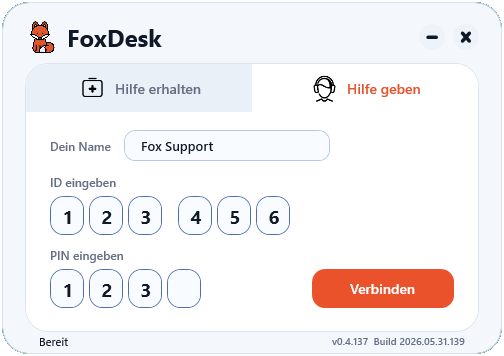
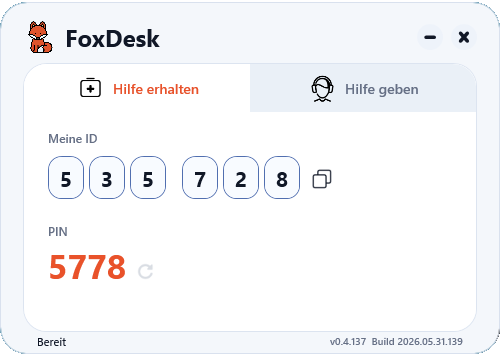
The person who needs help starts FoxDesk and sees their ID and PIN for the remote support session.
FoxDesk is your simple desktop sharing and remote support tool for quick help. Share ID and PIN, connect, and help right away - without complicated setup.
How it works
The person who needs help starts FoxDesk and sees their ID and PIN for the remote support session.
ID and PIN can be shared by phone, chat, or in person with the supporter.
The supporter enters the details and starts the desktop sharing session for quick remote help.
Remote Support Software
FoxDesk is a simple remote support and desktop sharing tool for Windows. It helps supporters connect to another PC with ID and PIN, see the remote screen and assist directly.
The goal is not a bloated enterprise suite, but a clear remote desktop tool for fast help, customer support, friends, colleagues and small IT teams.
FoxDesk covers the core ideas people search for: remote support software, remote desktop software, screen sharing, remote assistance and a lightweight alternative to TeamViewer, AnyDesk or RustDesk.
Features
Connect to a Windows PC and help without being physically there.
Show the remote screen clearly, so support steps become easier to understand.
Start a support session with a simple ID and PIN flow.
FoxDesk focuses on Windows systems and quick support scenarios.
FoxDesk is currently free and grows as an ambitious one-person project.
The interface stays focused on the actual support workflow.
Alternatives
FAQ
FoxDesk is remote support software for Windows. It helps share screens, control a PC remotely and start quick support sessions with ID and PIN.
FoxDesk is designed as a lightweight TeamViewer alternative for simple remote support and fast help from anywhere.
FoxDesk can be used as a simple AnyDesk alternative when clear handling and quick Windows remote access matter most.
FoxDesk is an alternative to RustDesk for people who want a small, direct and easy-to-understand remote desktop tool.
FoxDesk is currently free to use and is an ambitious one-person project. Donations help with development, testing and infrastructure.
Yes, FoxDesk is built for Windows and is intended for Windows 10 and Windows 11.
A basic support session does not need a complicated account flow. ID and PIN are enough to connect.
The person who needs help starts FoxDesk and shares ID and PIN. The supporter enters the data and starts the session.
Desktop sharing means transferring a PC screen so a supporter can see the desktop and help remotely.
Remote support is technical help from anywhere. A supporter can see the screen, control mouse and keyboard and solve issues faster.
Remote support software enables access to a remote PC for support, maintenance or help without an on-site visit.
FoxDesk is especially interesting for quick help, small teams and direct support situations. Larger business features are added step by step.
FoxDesk currently works with ID and PIN. Permanent access features are developed carefully.
File transfer is a useful future feature. The current website focuses on remote support and desktop sharing.
FoxDesk uses deliberate session access through ID and PIN. Security features are expanded and described transparently.
FoxDesk is not code-signed yet. That can make Windows show a warning for unknown publishers.
Yes, FoxDesk is intended for IT support, helpdesk remote support, customer help and quick PC remote control.
Windows Remote Desktop focuses more on logging into remote systems. FoxDesk focuses on simple visible support sessions using ID and PIN.
Yes, if they need simple Windows remote support for quick help. The download is available from foxdesk.me.
You can use FoxDesk, give feedback, report issues or support the project through the Donate page.
Download FoxDesk and help friends, customers, or colleagues directly from anywhere.